testflight-feedback-loop is a free skill for Claude Code.
Send TestFlight feedback from your phone, open the Claude app, and say “check feedback.”
Your Mac at home pulls the feedback, fixes it, and ships the next build to TestFlight. You never sit
down at the desk, and Xcode never opens a window.
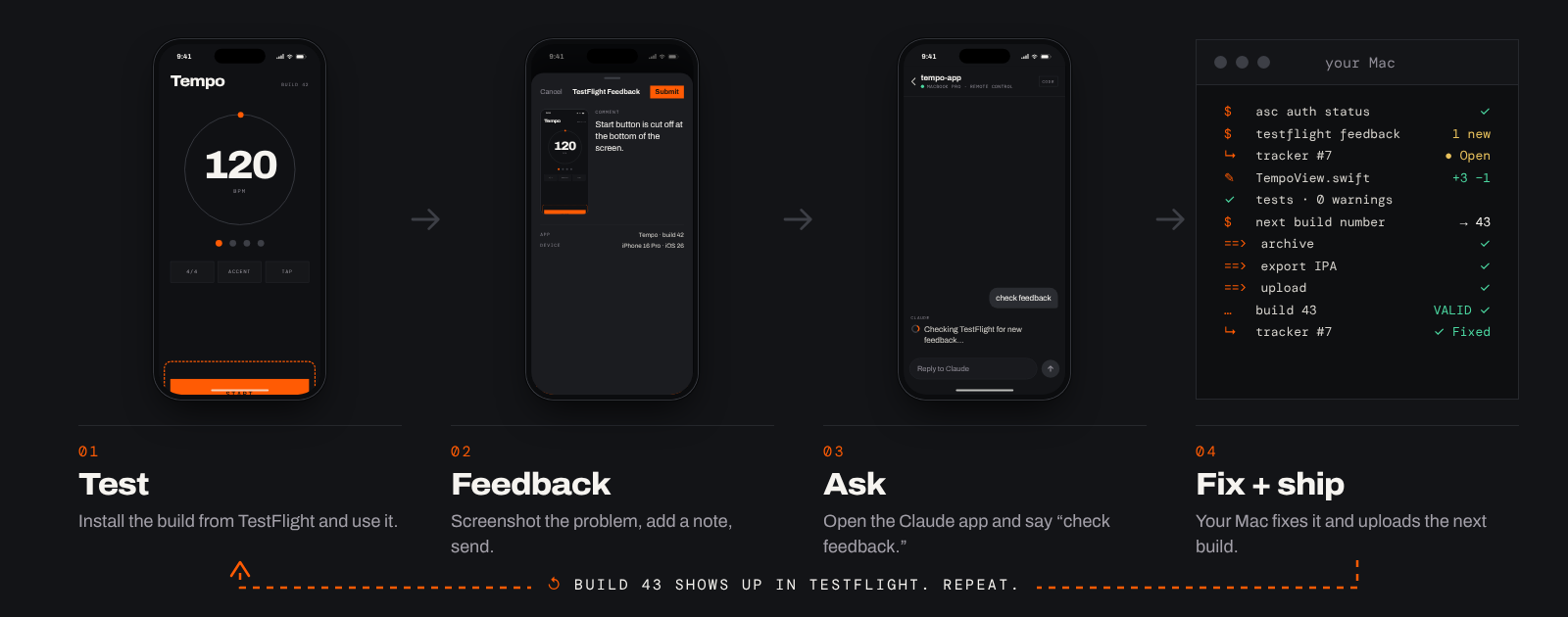
Two of the four steps happen on your phone. The other two happen on your Mac, without you.
01
Test
Every build lands in TestFlight. Install it and use your app like anyone else would.
On your phone · TestFlight
02
Feedback
Spot something? Take a screenshot and send it as TestFlight feedback, with a note.
On your phone · TestFlight
03
Ask
Open the Claude app and say “check feedback.” That’s the whole instruction.
On your phone · Claude app
04
Fix + ship
Claude pulls the feedback and crashes, logs each item, fixes it, bumps the build, and uploads.
On your Mac · headless
Test, feedback and ask happen on your phone. Fix and ship happen on your Mac.
Drive it from your phone.
Building an iPhone app needs a Mac with Xcode, so the work always runs on your Mac. Your phone is the
remote. Any coding agent you can message from your phone works, as long as it runs on that Mac.
What I use
Claude Code + the Claude app
Remote Control opens your Mac’s Claude Code session in the Claude app. Same session, same files, from anywhere.
On your Mac, in your app’s folder, run claude remote-control. Already in a session? Type /rc.
On your phone, open the Claude app, go to Code, and pick the session with the green dot.
Say “check feedback” or “ship to TestFlight.”
Also works
Codex + the ChatGPT app
Codex reads the same skill format. The ChatGPT app can control Codex running on your Mac.
Put the skill in your Codex skills folder (~/.codex/skills by default).
In the Codex app on your Mac, pair your phone by scanning its QR code with the ChatGPT app.
Say “check feedback.”
Bring your own
Any other agent
The skill is a SKILL.md, two reference files, and two shell scripts. If your agent can read
those and run shell commands on your Mac, and you can message it from your phone, it can run this loop.
Your Mac has to stay awake and online while you’re out. Plug it in and run
caffeinate -dims in a spare terminal, or turn on “Prevent automatic sleeping when the
display is off” in System Settings. If it does sleep, Remote Control reconnects when it wakes.
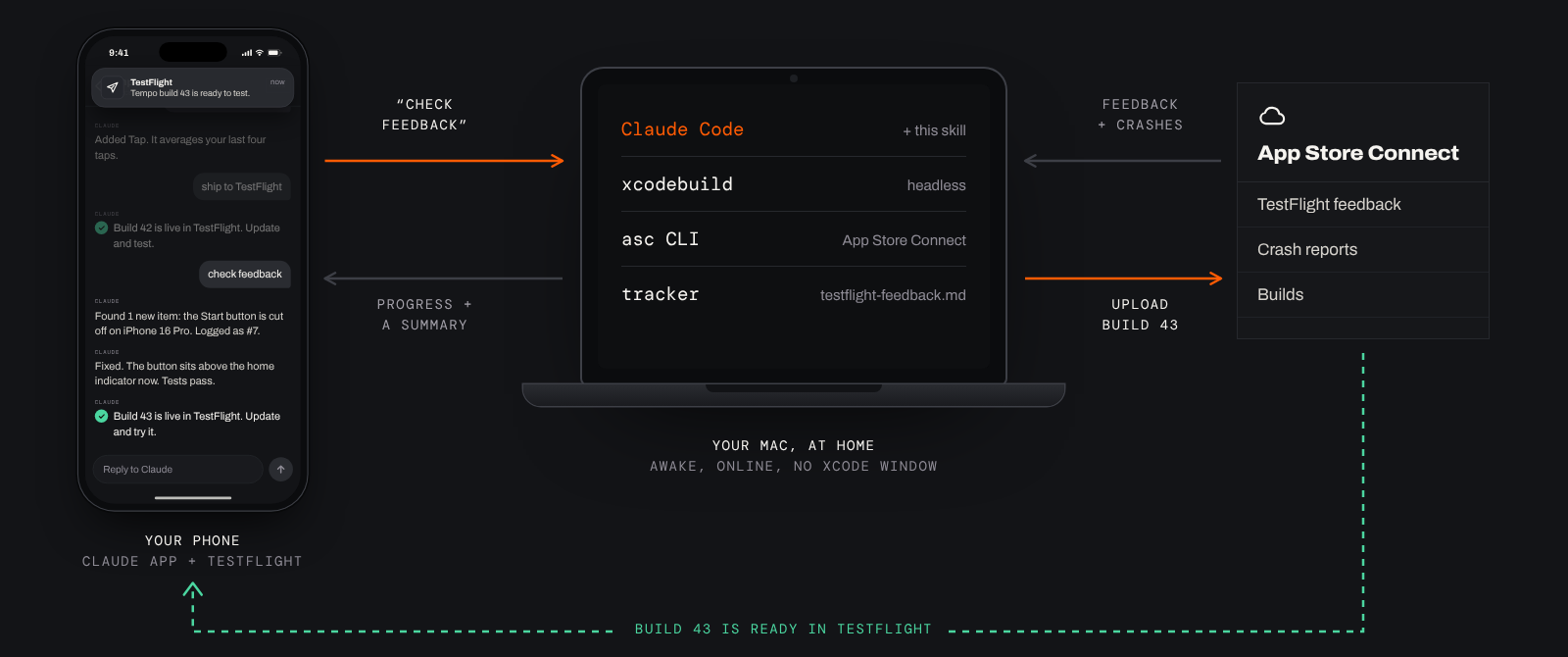
Under the hood: your phone talks, your Mac does the work.Before you start
What you need, once.
Set these up one time. After that, the whole loop is your phone.
On your Mac
XcodeFrom the Mac App Store. Open it once, and sign in under Xcode, Settings, Accounts so automatic signing works.
Xcode command line toolsxcode-select --install
HomebrewFrom brew.sh. Used to install the next two.
asc CLIThe App Store Connect command line tool: brew install asc
XcodeGenonly if you use project.ymlbrew install xcodegen
Claude CodeSigned in with a Claude plan that includes Remote Control (Pro, Max, Team or Enterprise). Or Codex, if that’s your agent.
Your app’s projectA git repo that builds clean on the simulator.
With Apple
Apple Developer Program membershipNeeded for TestFlight.
Your app in App Store ConnectAn app record with your bundle ID.
An App Store Connect API keyUsers and Access, Integrations, App Store Connect API. Give it App Manager access, download the .p8 file once, and note the Key ID and Issuer ID.
You, as an internal testerAdd yourself to an internal TestFlight group so new builds reach your phone on their own.
On your phone
TestFlightSigned in with the Apple ID you added as a tester. Turn on its notifications so you know when a build lands.
The Claude appSigned in to the same Claude account as Claude Code on your Mac. Using Codex? The ChatGPT app.
Set it up.
About fifteen minutes, most of it waiting on Apple’s website.
Install the tools
Command line tools, the asc CLI, and Claude Code. Skip any you already have.
Terminal
$ xcode-select --install
$ brew install asc
$ brew install xcodegen # only if your project uses project.yml$ curl -fsSL https://claude.ai/install.sh | bash
Connect asc to App Store Connect
Make an API key at App Store Connect, Integrations,
then save it as a named profile. If you have more than one developer account, make one profile each. The
skill checks which one is active before every command.
Optional but good: asc install-skills adds the asc team’s own agent skills, and this skill
hands command-level detail to them when they’re there.
Ship the first build from your desk
In your app’s folder, start Claude Code and say “ship to TestFlight.” The first run
finds your app ID, scheme and team, and offers to save them in your project’s
CLAUDE.md, so every run after this one is hands-off.
Turn on Remote Control and walk away
Run claude remote-control in the same folder (or /rc in a running session), and leave
the Mac awake. From here on, everything happens from your phone.
Terminal
$ cd ~/Projects/MyApp
$ claude remote-control --name "MyApp"
Turn on push, so your phone taps you on the shoulder. In Claude Code, run /config and turn on
Push when actions required (permission prompts come to your phone and you approve them there) and
Push when Claude decides (so it can ping you when the build is ready). To make runs quieter, pre-approve
asc, xcodebuild and the skill’s two scripts in your Claude Code permission settings.
What to say.
Plain words. These are the ones I use from the couch.
check feedback
Pulls new TestFlight feedback and crash reports, downloads the screenshots, logs every item in testflight-feedback.md, and gives you a short triage list to approve.
fix them and ship it
Makes the fixes, runs the build and tests, then ships the next build and marks those items fixed in that build.
ship to TestFlight
Checks the asc profile, bumps the build number, archives, exports, uploads, and waits in the background until the build is ready.
what’s still open?
Reads the tracker and tells you what’s fixed, what’s open, and what needs a decision from you.
Built-in guardrails.
The skill is strict about the things that go wrong when you’re not watching.
Right account, every timeIt confirms the active asc profile before any App Store Connect command.
Build number onlyIt never touches your version number. Going from 1.0 to 1.1 is your call.
The tracker is the memoryEvery item is logged with the build that fixed it, so nothing is fixed twice or lost between sessions.
No red buildsIt won’t ship a build that fails to compile or has failing tests.
Per-project settingsApp ID, team and scheme live in each project’s CLAUDE.md, never carried across apps.
Plain summariesUpdates on your phone say what changed and what to test, not a wall of code.
Questions.
Does Claude run on my phone?
No. Claude Code runs on your Mac, because building an iPhone app needs Xcode, and Xcode only runs on a Mac. The Claude app on your phone is a window into that session. You type, it works at home.
Do I need to be on the same Wi-Fi as my Mac?
No. Remote Control goes through your Claude account, so your phone can be anywhere with a signal. Your Mac just needs to be awake and online.
Does it submit my app to the App Store?
No. It ships to TestFlight and stops there. Submitting for review and changing the version number stay with you. For a pre-submission check, see my ios-submission-audit skill.
Does it work with Codex, Cursor, or other agents?
The skill is plain Markdown and shell scripts, so any agent that reads skills and can run commands on your Mac can use it. I built and tested it with Claude Code. Codex reads the same format, and the ChatGPT app can control Codex on your Mac.
What about crashes, not just feedback?
“Check feedback” pulls TestFlight crash reports too, and folds them into the same triage list, so a crash nobody wrote a note about still gets seen.
Which Claude plan do I need?
The skill itself works on any plan that runs Claude Code. Remote Control, the part that lets you drive it from your phone, needs a Pro, Max, Team or Enterprise plan. API keys don’t work with Remote Control.
Is it free?
Yes. MIT license. Read it, change it, make it yours. It’s on GitHub.
Get testflight-feedback-loop
Free and open source. One git clone and you’re in.